

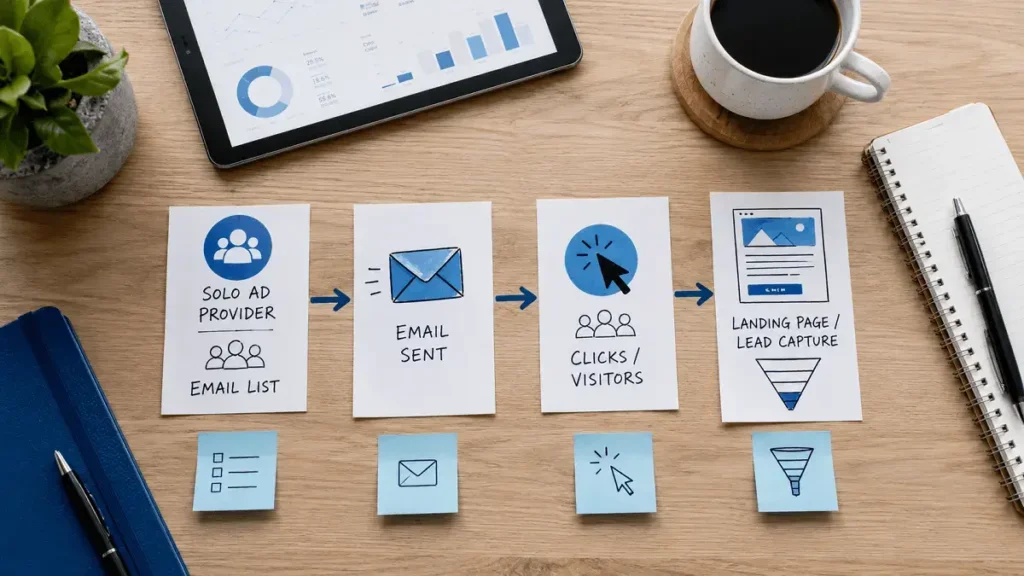
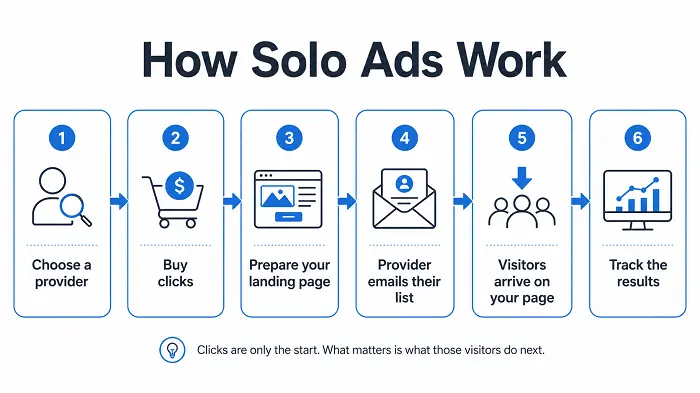
Solo ads work by paying someone with an email audience to send visitors to your page. You choose how many clicks you want, give the provider your link, and the provider emails their audience until the agreed traffic is delivered.
Simple flow: choose a provider → buy clicks → prepare your page → provider sends the email → visitors arrive → track the results
Where people usually get caught out is assuming that a completed order means a successful campaign. Getting 300 clicks is one thing. Getting 300 clicks that turn into useful subscribers is another.
Quick Answer
Solo ads work by paying someone with an existing email list to send visitors to your landing page or offer. You usually buy a set number of clicks rather than paying for the email send itself.
The basic flow is simple: choose a provider, order clicks, send the traffic to one page, then track what happens after the click.
- A Quick Example
- How to Use Solo Ads in a Campaign
- Then You Give the Provider Your Link
- The Provider Sends the Email
- What Happens While the Traffic Is Being Delivered?
- What Happens When All the Clicks Have Been Delivered?
- Why Your Click Count May Not Match the Provider's Exactly
- Things That Can Go Wrong
- A High Opt-In Rate Can Fool You
- Decide What a Good Campaign Means Before You Buy
- How Do You Decide Whether to Buy Again?
- Frequently Asked Questions
A Quick Example
Say you order 200 clicks for $160.
Example
Cost: $160
Clicks delivered: 200
New subscribers: 68
Opt-in rate: 34%
Cost per lead: about $2.35
Those numbers give you a useful first read, but I still would not judge the campaign from them alone. If most of the 68 subscribers never open or click another email, the result may be much weaker than the 34% opt-in rate first suggests.
That is why I think of solo ads as a process rather than a one-time traffic purchase: delivery tells you what arrived, while follow-up tells you whether the traffic was actually useful.
How to Use Solo Ads in a Campaign
A common way to use solo ads is to send the traffic to a focused landing page where visitors can join your email list. From there, your follow-up emails can continue the conversation and introduce your offer after the initial click.
A simple solo ad campaign might look like this:
Solo ad → Landing page → Email signup → Follow-up emails → Offer
The important part is having the page, email sequence and tracking ready before the traffic starts. That gives you a much better chance of understanding whether the campaign produced useful leads rather than just clicks.
If you’re setting up your first campaign, see How to Track Solo Ads for the numbers worth watching.
First, You Need Somewhere to Buy the Traffic
Solo ads can be bought directly from an individual seller, through a traffic company, or on a marketplace that lists several providers in one place. Marketplaces can make comparison easier because you can usually see more seller information before ordering, while direct deals may be simpler but depend more heavily on what the provider chooses to disclose.
Before spending anything, I would look at:
- price per click
- minimum order
- available countries
- targeting options
- delivery terms
- refund or replacement policy
- buyer feedback
- how clearly the provider explains the traffic
You do not need to know everything about a provider before testing them, but I would want more than a checkout button and a promise of “high-quality traffic.”
See How to Choose a Solo Ad Provider for a deeper look at this.
How Many Clicks Do You Buy?
Once you have a provider, you choose an order size.
You may see options such as:
- 100 clicks
- 200 clicks
- 300 clicks
- 500 clicks
- 1,000 clicks
It is tempting to assume that more clicks automatically mean a better test, but that is not always true. If you know very little about a provider, a smaller order can tell you quite a lot without putting a large budget at risk.
Example
Price per click: $0.70
Test size: 200 clicks
Estimated cost: $140
If that test produces promising leads, you can decide whether another order makes sense.
If it does not, you have learned something without spending $700 on 1,000 clicks.
I cover test sizes separately in How Many Solo Ad Clicks Should You Buy?.
Targeting Comes Next
Some providers let you narrow the traffic by geography or other audience filters. Depending on the seller, that might include:
- country
- Tier 1 countries
- niche
- device
- gender
- buyer-related audiences
The options vary a lot from one provider to another, and I would not pay for extra filters just because more targeting sounds better. The useful question is whether a filter helps you reach people who are more likely to care about the page or offer. If the funnel is designed specifically for US visitors, for example, paying extra for the right geography can make sense.
Your Landing Page Should Be Ready Before You Order
I would not place the order first and start fixing the landing page afterward. Once paid traffic starts arriving, every broken form, slow page or bad mobile layout costs you real clicks.
Before sending traffic, check:
- the page loads quickly
- it works on mobile
- the form submits properly
- subscribers go to the correct email list
- the thank-you page works
- your follow-up emails are active
A solo ad landing page is usually fairly simple because it has one main job: convince the visitor to take the next step. Too many links, menus, buttons and unrelated information can work against that.
Set Up Tracking Before the Campaign Starts
Tracking is one of those things that seems unnecessary until you need it.
At minimum, I would want to know:
- how many clicks arrived
- where they came from
- how many people opted in
- how much each lead cost
If you plan to test more than one provider, make sure you can separate the campaigns.
You can do that with:
- separate tracking links
- UTM parameters
- different landing-page URLs
- tracking software
- tags inside your email platform
The exact method matters less than being able to answer one simple question later: which provider sent these leads? If all your traffic is mixed together, comparing sellers becomes difficult very quickly.
For a deeper look at campaign tracking, see How to Track Solo Ads.
Then You Give the Provider Your Link
Once the page and tracking are ready, you send the provider the URL.
That may be your landing-page URL directly, or it may be a tracking link that redirects the visitor to your page.
If you are using a tracker, the path might look like this:
Tracked traffic
Provider email → Tracking link → Landing page
The tracking step lets you record information about the visit before sending the person to the final page.
The Provider Sends the Email
The provider sends the promotional email to part of their own audience and includes your link. Interested readers click through to your page; you do not receive a copy of the provider’s email database. That is one of the main differences between buying a solo ad and buying a list of addresses.
What Happens While the Traffic Is Being Delivered?
Delivery speed varies. Some orders finish quickly while others are spread over a longer period, so I would keep an eye on the campaign without treating every short-term change in the dashboard as meaningful.
A few things are worth checking:
Is the traffic actually arriving?
Your own analytics should show activity.
Does the geography look right?
If you paid for certain countries, check whether your data roughly matches.
Is the landing page still working?
Forms break. Plugins fail. Pages occasionally go down.
Are people opting in?
A very low opt-in rate can be a sign that something needs attention.
Is your tracking recording properly?
Finding out after delivery that your tracking link was broken is not much fun.
What Happens When All the Clicks Have Been Delivered?
Once the agreed number of clicks has arrived, the provider may have finished their part, but I would not make a quick decision about the campaign yet.
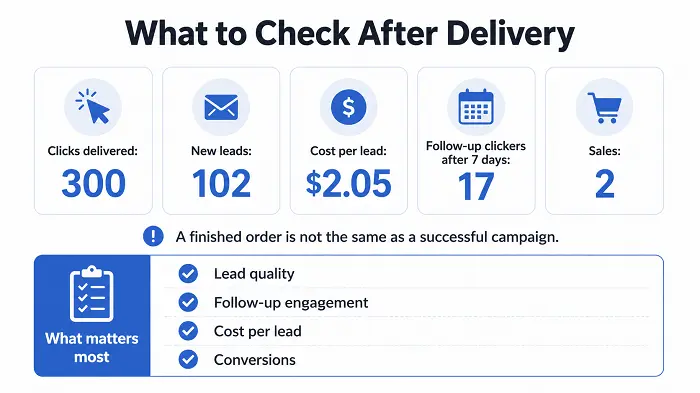
The campaign still has more to tell you after delivery. For example:
After delivery
Clicks: 300
New leads: 102
Cost per lead: $2.05
Follow-up clickers after 7 days: 17
Sales: 2
The first numbers describe what happened on the landing page; the later numbers tell you whether those subscribers remained interested. That second part is what makes the result useful beyond simple click delivery.
Why Your Click Count May Not Match the Provider’s Exactly
Your tracker and the provider’s system may show slightly different numbers, and that does not automatically mean anything is wrong. Different systems may handle things such as:
- duplicate clicks
- repeat visitors
- bots
- suspicious activity
- excluded countries
in different ways.
A small difference is one thing.
If your tracker shows 170 visitors and the provider says 300 valid clicks were delivered, I would want an explanation.
It helps to understand how the provider counts a valid click before buying.
Things That Can Go Wrong
Solo ads are simple in principle, but a campaign can still fail for reasons that have nothing to do with the number of clicks delivered.
- The page is broken: paid traffic reaches a form or page that does not work.
- Tracking is wrong: visitors arrive, but you cannot tell where they came from.
- The audience is a poor fit: the traffic may be real while still being wrong for your offer.
- The opt-in rate is weak: the problem may be the traffic, the page, or both.
- The opt-in rate looks great, but nobody engages later: this is easy to miss because the campaign initially appears successful.
- The traffic pattern looks unusual: fast delivery is not automatically bad, but a very concentrated burst is worth checking.
- The geography is different from what you ordered: compare the provider’s claim with your own analytics.
A High Opt-In Rate Can Fool You
A strong landing-page conversion rate can look impressive while hiding weak lead quality. Compare these two campaigns:
| Campaign | Clicks | Opt-ins | Opt-in rate | Follow-up clickers |
|---|---|---|---|---|
| A | 200 | 90 | 45% | 5 |
| B | 200 | 62 | 31% | 21 |
If you only look at the landing page, Campaign A wins easily. If you care about building an engaged list, Campaign B suddenly looks much more interesting. Opt-in rate is useful, but it should not be the only number you use to judge the traffic.
Decide What a Good Campaign Means Before You Buy
It is much easier to judge a campaign when you know what you are looking for.
If your main goal is list building, you may care about:
- cost per lead
- opt-in rate
- follow-up engagement
If your main goal is sales, you may care more about:
- conversions
- revenue
- return on ad spend
- break-even point
I would write down the basic target before placing the order.
Before the campaign
Budget: $200
Planned clicks: 250
Main goal: build the email list
Maximum CPL I am comfortable with: $3
Check lead engagement again: 7 days after delivery
The exact numbers are only an example.
What matters is having something to compare the result against.
Use the Solo Ad Campaign Calculator to plan and analyze your solo ad orders.
Otherwise, it is very easy to look at almost any campaign afterward and find a reason to call it successful.
How Do You Decide Whether to Buy Again?
I would look at the whole experience.
Ask yourself:
- Did the provider deliver what was ordered?
- Did the geography look reasonable?
- Was the cost per lead acceptable?
- Did the subscribers engage afterward?
- Did anything in the traffic look unusual?
- Was communication with the provider good?
- Did the campaign fit your offer?
A seller delivering all 300 clicks quickly is not enough reason by itself to place another order.
Likewise, one average test does not automatically mean the provider is terrible.
Traffic can vary, funnels can vary, and experiences can vary.
The goal is to make the next decision with more information than you had before the first order.
Solo ads themselves are not complicated. You buy traffic, the provider emails their audience, and the visitors arrive on your page.
What takes more work is measuring whether those visitors were actually useful.
If you’re new to solo ads, the next thing worth understanding is Are Solo Ads Legit?.